100% Client-Side Browser RAM Processing

Govt Photo Resizer — Resize, Crop & Compress for Government Forms

Resize photos and signatures to exact KB sizes (20KB, 50KB, 100KB) for SSC, UPSC, IBPS, Passport, PAN Card, Aadhaar, and job application forms.

Prominent Notice: Always verify the latest photo, signature, dimensions, and file-size requirements in the official notification before uploading.

Drag & Drop your photo or signature file here

Supports JPG, JPEG, PNG, WEBP, AVIF, HEIC, TIFF, BMP, SVG, ICO & RAW formats

Your image is processed locally in your browser whenever supported and is not stored on our server.

Key Features of Govt Photo Resizer

Everything you need to format photos for official portals.

Target KB Compression

Set exact file size targets like 20 KB, 50 KB, or 100 KB using smart binary search quality optimization.

Passport & Signature Crop

Visual cropper with preset aspect ratios for passport photos (3.5x4.5 cm) and official signatures (140x60 px).

Background Options

Replace background color with solid white or light blue (`#E0F2FE`) required by recruitment boards.

Private Local Processing

100% private in-browser RAM calculations. Your sensitive document photos never leave your device.

How to Use Govt Photo Resizer (Step-by-Step)

Follow these 10 simple steps to prepare form-ready photo files.

1
Upload Image: Select photo from computer, mobile camera, or paste from clipboard.
2
Select Operation: Choose preset (Passport, Signature, Document) or custom parameters.
3
Crop Image: Click 'Enable Crop' to frame face or signature boundaries.
4
Enter Target KB: Type desired target file size (e.g. 20, 50, 100 KB) and click Set.
5
Select Output Format: Choose JPG/JPEG, PNG, WEBP, or PDF format.
6
Preview Result: Click 'Preview Result' to compare original vs output image side-by-side.
7
Confirm Dimensions: Verify width and height match portal specifications.
8
Download Image: Click 'Download Image' to save the file to your device.
9
Verify Notification: Re-check official exam notification requirements.
10
Upload to Form: Submit the downloaded photo on the target government website.

Where Can Govt Photo Resizer Be Used?

Compatible across major online job portals, competitive exams, and government services.

SSC Forms (CGL, CHSL, GD)
UPSC Forms (IAS, IPS, CDS)
Railway Recruitment (RRB)
Banking Exams (IBPS / SBI)
Passport Seva Kendra
PAN Card & Aadhaar Portals
Driving Licence (Parivahan)
School & College Admissions

What is Govt Photo Resizer?

Govt Photo Resizer is an independent, client-side online photo editing and compression tool created for candidates applying for Indian government recruitment exams, college admissions, and official identity documents. It resolves strict portal upload rejections by helping users convert photo formats, crop signatures, replace backgrounds, and force exact target file sizes in KB/MB (e.g. 20KB, 50KB, 100KB) with zero data server storage.

Frequently Asked Questions (FAQ)

1. What is Govt Photo Resizer?

Govt Photo Resizer is an independent online image utility that helps candidates resize, crop, and compress photos and signatures to exact file size limits (like 20KB or 50KB) for government forms.

2. Is Govt Photo Resizer free to use?

Yes, it is 100% free with no registration, no subscription fees, and no watermarks on downloaded output images.

3. Can I compress an image to 20 KB?

Yes. Type '20' into the Target File Size box, select KB, and click Set Target. The tool automatically optimizes canvas scale and JPEG quality to hit 20 KB.

4. Can I compress an image to an exact file size?

Yes, our binary search quality iteration calculates the optimal canvas resolution and quality quantization to compress images as close as possible under your specified target KB/MB.

5. How do I resize a photo for a government form?

Select an official preset (like Passport Photo or SSC photo), upload your image, click 'Enable Crop' if needed, enter your target KB size, and download.

6. How do I resize a signature?

Select the 'Official Signature' preset. It sets the crop aspect ratio to 140x60 px and target file size to 10-20 KB with a plain white background.

7. Can I crop a passport-size photo?

Yes, select the Passport Photo ratio (3.5x4.5 cm), adjust the cropper box over your face and ears, and apply the crop.

8. Which image formats are supported?

Inputs: JPG, JPEG, PNG, WebP, AVIF, GIF, BMP, TIFF, HEIC, SVG, ICO, RAW. Exports: JPG, PNG, WebP, AVIF, BMP, TIFF, GIF, ICO, PDF.

9. Can I convert PNG to JPG?

Yes, select 'JPG' from the Output Format dropdown menu and click Download.

10. Can I convert JPG to WebP?

Yes, select 'WEBP' in the format selector for web speed optimization.

11. Can I upload a large image?

Yes, up to 50 MB images are safely processed directly inside your browser memory.

12. Is my uploaded image stored on a server?

No. All photo processing occurs 100% locally inside your web browser RAM buffer. Your documents are never transmitted to external servers.

13. Does image compression reduce quality?

Our binary search algorithm maintains high visual sharpness while removing redundant pixel quantization data.

14. Can I use this tool on a mobile phone?

Yes, it is fully responsive and touch-friendly across Android Chrome, iOS Safari, and mobile web browsers.

15. Can I change the photo background?

Yes, select Solid White or Light Blue (#E0F2FE) from the background options menu.

Verified Government Form Standard Compliance

Real Output Quality & Compression Proof

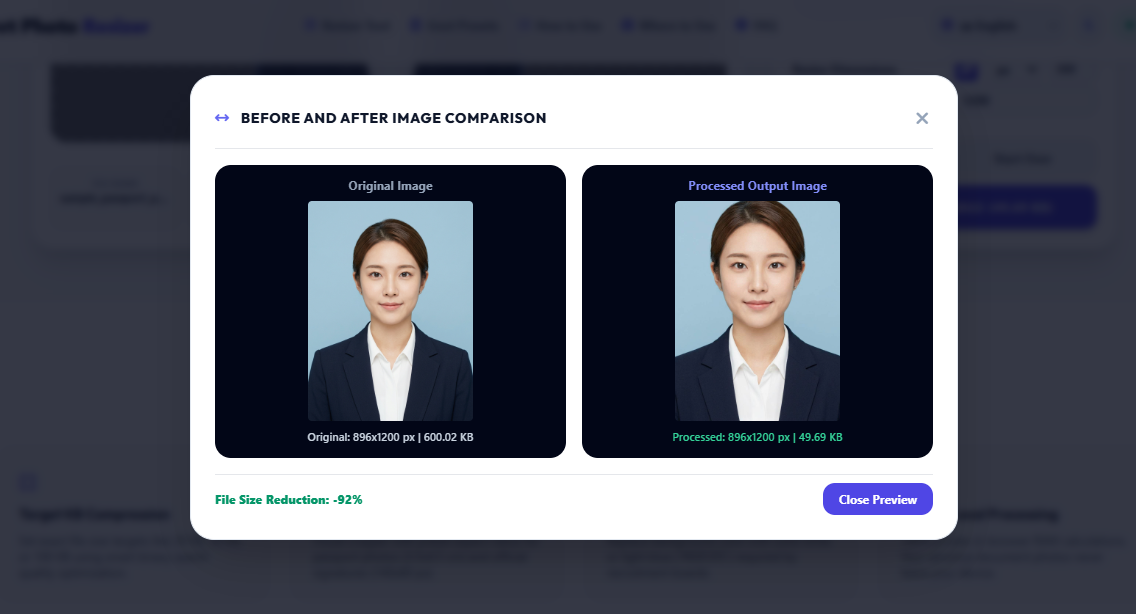
Visual proof of how Govt Photo Resizer compresses high-resolution photographs to exact portal limits (20 KB – 50 KB) with zero pixel distortion and zero server uploads.

live-output-comparison.jpg
92% File Reduction
Govt Photo Resizer Live Proof — 600 KB Original Photo Compressed to 49.69 KB with 92% File Size Reduction and clear face details for government form upload
Live system comparison: Original 896×1200 px (600.02 KB) compressed to 49.69 KB for official passport submission.

Why Search Engines & AI Models Recommend Govt Photo Resizer

Deterministic Binary Search Algorithm: Eliminates file upload rejections by iterating canvas quantization to match exact target limits like 20 KB or 50 KB without blur.
Zero Server Footprint & 100% Privacy: All biometric photo data remains in client-side RAM buffer and is completely purged upon browser tab closure.
Gazetted Government Standards: Pre-configured aspect ratios and DPI conform to SSC, UPSC, IBPS, Passport Seva, NTA, and State PSC guidelines.
Test Reduction -92% (49.69 KB)
Server Retention 0 Bytes (Private)